Supplier feeds solve an ecommerce problem: they keep a store updated with current products, costs, stock levels, and specifications. But they often create another problem at the same time. The information supplied by a distributor is not always the information you want customers to see.
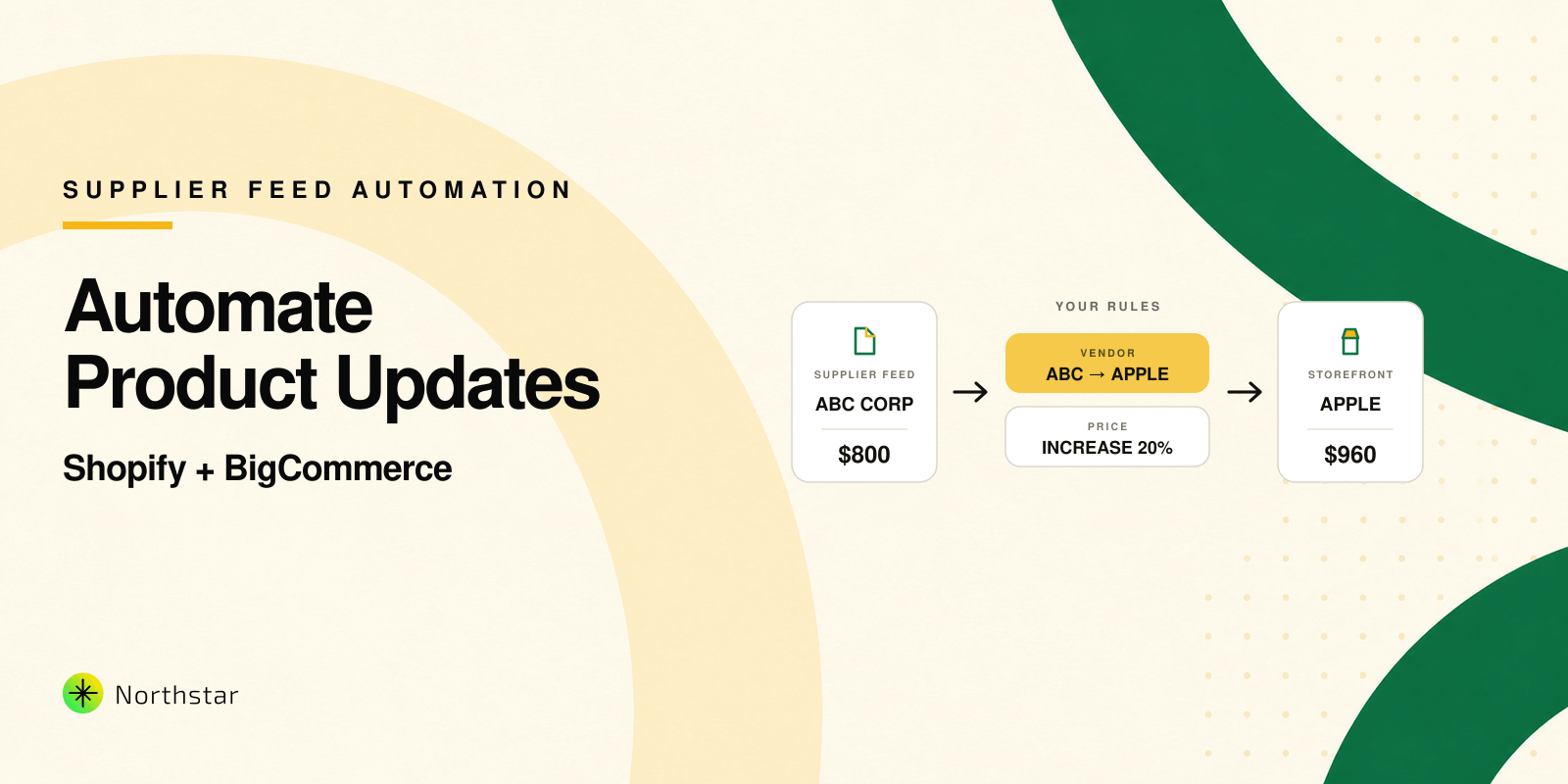
Imagine that your supplier, ABC Corporation, sends an iPhone 15 through a daily product feed. The feed correctly identifies ABC Corporation as the supplier, but you want the product vendor or brand on your storefront to be Apple. You change it manually today. Tomorrow, the feed runs again and ABC Corporation returns. Now someone has to export the products, correct the field, and import the file again.
The better approach is not to stop using supplier feeds. It is to create an automation layer between the feed and the customer-facing catalog.
Why supplier feeds rarely match your storefront requirements
A supplier feed is designed around the supplier's system. Your storefront is designed around your customers, merchandising strategy, and internal processes. Those two structures rarely match perfectly.
A distributor may use its legal company name in the vendor field, while you want to show the manufacturer. It may send abbreviated titles containing warehouse codes. Its pricing may represent wholesale cost rather than your intended retail price. It may also use categories, tags, or product types that do not match the way your Shopify or BigCommerce store is organized.
The real difficulty appears when the feed updates frequently. A one-time bulk edit fixes the catalog once, but it does not fix the process. If the next import restores the supplier's original values, your team is trapped in a loop of exporting, editing, importing, and checking the same information.
Treat supplier information and storefront information differently
It helps to separate two ideas:
- Source information is what arrives from the supplier, such as supplier name, cost, stock, source title, and warehouse classification.
- Storefront information is what shoppers should see, such as brand, retail price, polished title, collections, categories, and sales messaging.
For example, ABC Corporation may remain useful internally because it tells your purchasing team where the product came from. Apple is the customer-facing identity that helps shoppers understand the product. Instead of repeatedly replacing one with the other in a spreadsheet, you can define a rule that translates the supplier value into the storefront value whenever qualifying products are updated.
In Shopify, this may mean changing the product vendor. In BigCommerce, the equivalent customer-facing field will often be the product brand. The terminology differs, but the operational requirement is the same: products received from a particular source should follow your preferred catalog standards.
Automate vendor and brand corrections
The first step is identifying products reliably. Depending on how your feed works, you might filter products using the existing vendor or brand, a supplier tag, a category, an SKU pattern, or another field that identifies the source.
You can then create a rule such as:
When the supplier value is ABC Corporation and the product belongs to the mobile phones group, set the customer-facing vendor or brand to Apple.
For Shopify catalogs, Northstar's guide to editing products by collection, vendor, or tag explains how these fields can be used to define focused product groups. When an existing word or phrase needs to be corrected across many records, find and replace for Shopify product data can handle the initial standardization.
Turn supplier costs into controlled retail prices
Pricing is often the most time-sensitive part of a supplier feed. Costs can change because of currency movements, manufacturer increases, freight charges, or market conditions. Copying the supplier's cost directly into the selling-price field may destroy your margin, but manually calculating every retail price defeats the purpose of an automated feed.
A repeatable pricing rule can convert the incoming value into your required price. Depending on the business, that could mean:
- Increasing the incoming price by a fixed percentage
- Adding a fixed amount to cover handling or shipping
- Applying different margins by supplier, brand, or category
- Updating the compare-at price alongside the selling price
- Using inventory conditions to protect margins on scarce products
The important point is that the pricing logic should be documented and repeatable. If the supplier changes a price tomorrow, the same approved formula should be applied again without someone rebuilding it in Excel.
If pricing is a major part of your workflow, see how to bulk increase Shopify prices by percentage and how to automatically update Shopify prices when inventory is low. The principles also apply to BigCommerce: define the right product group, apply the pricing rule, review the result, and repeat it consistently.
Standardize more than vendor names and prices
Supplier-feed problems rarely stop at two fields. Once you review the imported products, you may discover recurring patterns that can also become controlled updates.
Product titles may need supplier codes removed or brand names added. Descriptions may contain trade-only language, inconsistent formatting, or content that should not appear on the storefront. Tags might need to be added for filtering, promotions, or internal workflows. Shopify collections or BigCommerce categories may need to change as inventory and product attributes change.
Individually, each requirement looks like a small edit. Together, they form your catalog policy: the rules that determine how imported products should look and behave in your store.
Use a bulk product editor as the control layer
A feed importer and a bulk product editor solve different parts of the workflow. The importer brings supplier information into the platform. The bulk editor lets you transform, standardize, and govern that information at scale.
With the Northstar Shopify Bulk Product Editor, merchants can filter products and update titles, descriptions, vendors, prices, tags, status, collections, and metafields. For BigCommerce, the Northstar BigCommerce Bulk Product Editor supports bulk changes and rules across titles, descriptions, brands, prices, categories, inventory conditions, status, and custom fields.
This creates a cleaner sequence:
- The supplier feed imports or updates the products.
- Products are identified using reliable source-related conditions.
- Your approved rules convert supplier values into storefront values.
- The proposed changes are previewed before they are applied.
- The operation is logged so the team can understand what changed.
- The same logic runs again when the catalog receives new supplier updates.
Instead of maintaining formulas across multiple spreadsheets, the business logic remains attached to a repeatable workflow.
Build rules carefully before running them every day
Automation saves time only when the rules are trustworthy. Begin with one supplier and a small group of products. Review how the feed identifies products, which fields it overwrites, and when the import normally finishes. Your correction workflow should run after the supplier sync, not while the same records are still being updated.
Preview the affected products and compare the old and new values. Check variants as well as parent products, especially when prices or inventory are involved. Keep source identifiers such as supplier SKU or cost in appropriate internal fields instead of deleting information your operations team may need later.
It is also worth documenting exceptions. Perhaps most ABC Corporation mobile phones are Apple products, but a small group belongs to another brand. Those exceptions should be excluded through additional conditions rather than corrected again by hand.
For larger Shopify catalogs, our article on why Shopify's default bulk editor may not be enough for scaling stores explains why reusable rules, previews, scheduling, and history become important. BigCommerce merchants can also read the story behind the Northstar Bulk Product Editor for BigCommerce.
Move from recurring corrections to a reliable catalog process
The hidden cost of a supplier feed is not the import itself. It is the collection of small corrections that someone must remember to make afterward. Each manual step introduces delay and creates another chance for the wrong vendor, price, title, or tag to reach the storefront.
A bulk product editor turns those corrections into a defined operating process. The feed continues supplying current information. Your rules continue shaping that information around your brand, margin requirements, merchandising structure, and customer experience.
The goal is not automation for its own sake. It is a catalog that remains consistent even while the underlying supplier information keeps changing. When a new product arrives tomorrow, your team should not need to remember every correction made today. The system should already know what the storefront requires.
That is when supplier feeds become genuinely useful: not when they merely move information into Shopify or BigCommerce, but when they can support a catalog that stays accurate, recognizable, and commercially ready without another round of daily spreadsheet work.